The installation tutorial of Zerotier on Synology DSM7 is readily available online, and you can choose to use the I'm not a mining god package version of Zerotier or install it using Docker.
Previously, I would install a client on each device that needed to access the internal network, joining them to the network. The drawback of this approach is that each device requires a client deployment, and when issues arise, they need to be maintained separately. Moreover, installing Zerotier on certain platform devices is not convenient, such as the unlocked ssh Xiaomi AX series router, which cannot be installed on the official firmware due to insufficient overlay space.
In fact, Zerotier's official routing function can achieve the effect of accessing all devices on the same internal network through only one Zerotier node:
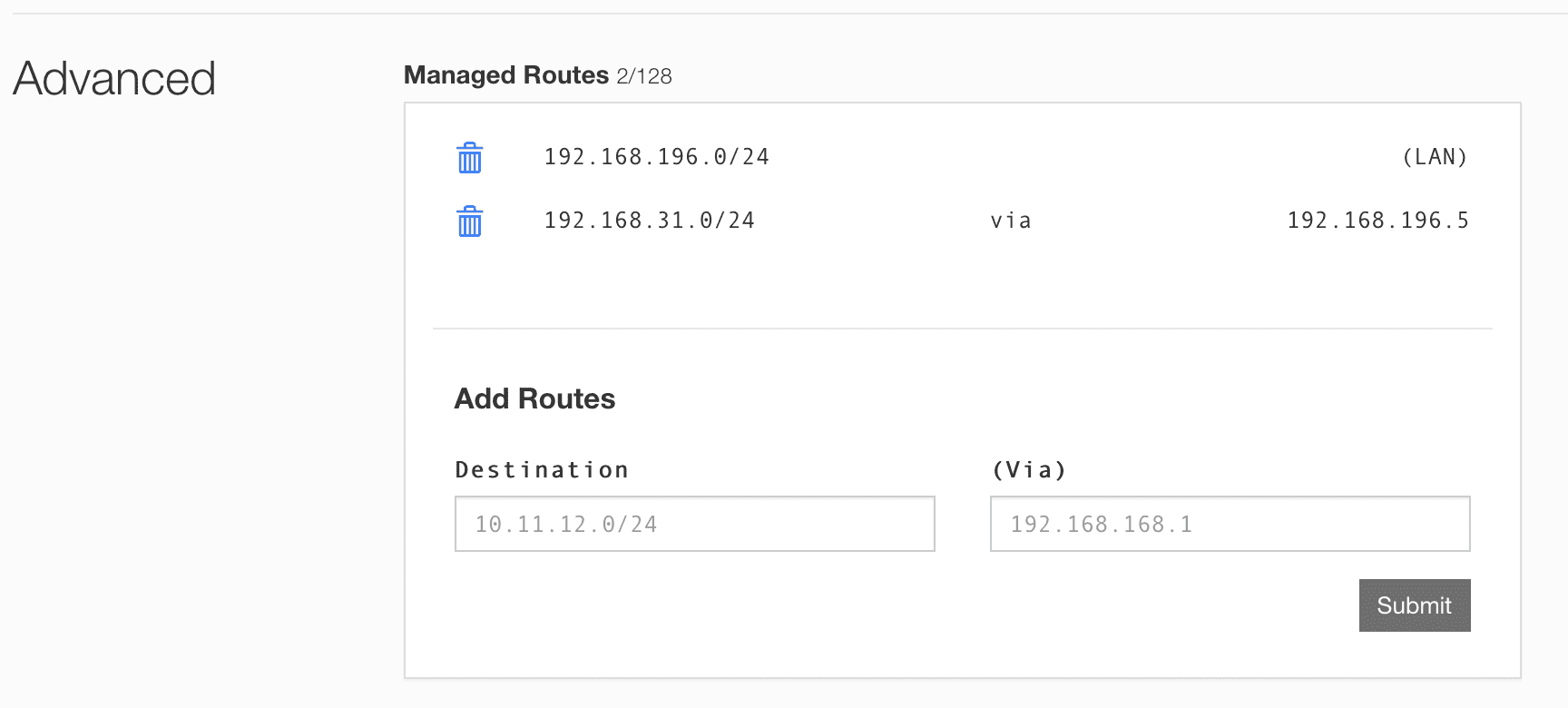
As shown in the figure, the Zerotier address of the intranet device is 192.168.196.5, and the intranet segment is 192.168.31.0/24. By adding this route rule, you can access the intranet device from the external network Zerotier node.
⚠️ Note that in Synology DSM7, you need to run the following command to allow IPV4 traffic forwarding:
echo 'net.ipv4.ip_forward=1' >> /etc/sysctl.conf
iptables -t nat -A POSTROUTING -s 192.168.196.0/24 -j MASQUERADE
若无法加载请检查网络环境。
若无法加载请检查网络环境,或切回 Disqus 稍后再试。