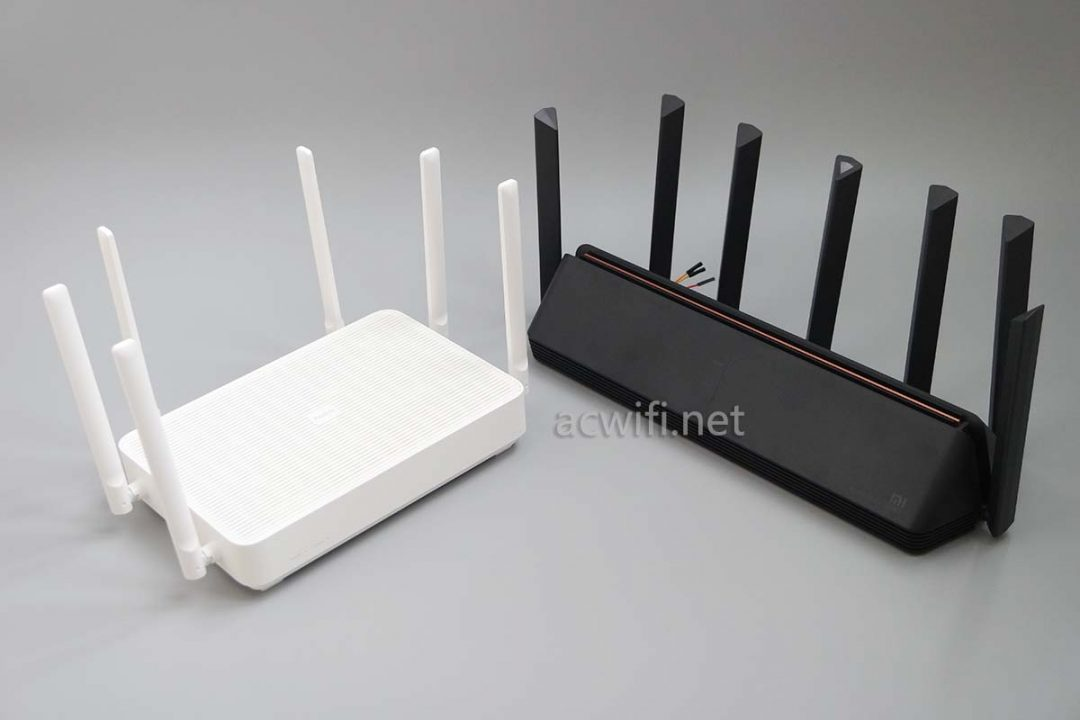
 Hardware Parameters
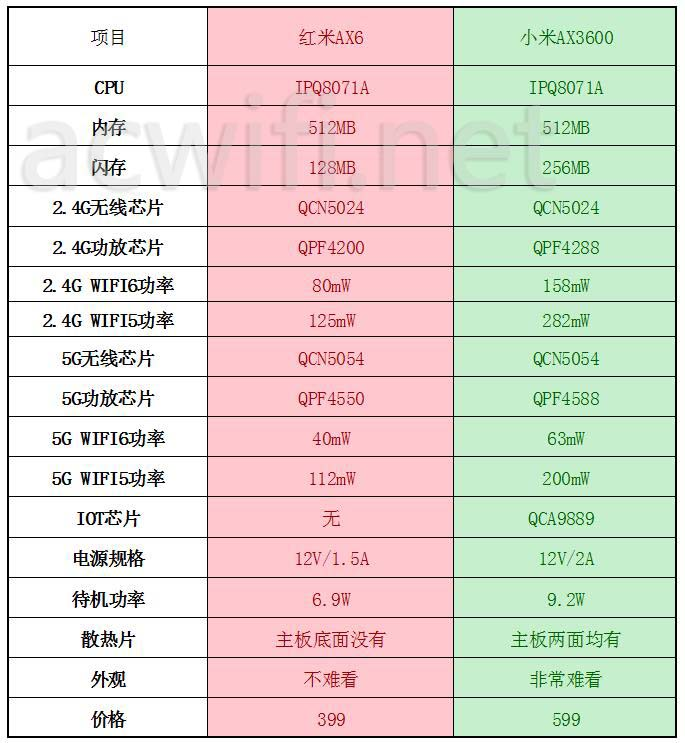 Tool File Download
AX3600 Unlock SSH
Downgrade to
1.0.17firmwareLog in to the
192.168.31.1backend and copySTOKConstruct the first request:
http://192.168.31.1/cgi-bin/luci/;stok=<STOK>/api/misystem/set_config_iotdev?bssid=Xiaomi&user_id=longdike&ssid=-h%3B%20nvram%20set%20ssh_en%3D1%3B%20nvram%20commit%3B%20sed%20-i%20's%2Fchannel%3D.*%2Fchannel%3D%5C%22debug%5C%22%2Fg'%20%2Fetc%2Finit.d%2Fdropbear%3B%20%2Fetc%2Finit.d%2Fdropbear%20start%3BConstruct the second request:
http://192.168.31.1/cgi-bin/luci/;stok=<STOK>/api/misystem/set_config_iotdev?bssid=Xiaomi&user_id=longdike&ssid=-h%3B%20echo%20-e%20'admin%5Cnadmin'%20%7C%20passwd%20root%3BAt this point, SSH is open, with the username
rootand passwordadminTo固化SSH and Telnet, you can use the following tool: mitool_arm64
mitool_arm64 unlock //解锁mtd
mitool_arm64 hack  //修改mtd9,固化ssh和telnet
AX3600 Lossless Expansion
Reference: Xiaomi AX3600 Modification without Disassembly - OpenWrt Developer Home
AX6 Unlocking SSH and Telnet
Prepare another OpenWrt router
Download tools and scripts: https://github.com/shell-script/unlock-redmi-ax3000
Upload
wireless.shto the OpenWrt router and execute it. After success, you can search for the WiFi SSIDMEDIATEK-ARM-IS-GREATConnect to the AX6 using a wired network cable, log in to
192.168.31.1, and copy theSTOKvalueReplace the
STOKvalue, construct the URL, and execute it:192.168.31.1/cgi-bin/luci/;stok=<STOK>/api/misystem/extendwifi_connect?ssid=MEDIATEK-ARM-IS-GREAT&password=ARE-YOU-OKConstruct the second URL:
192.168.31.1/cgi-bin/luci/;stok=<STOK>/api/xqsystem/oneclick_get_remote_token?username=xxx&password=xxx&nonce=xxxAt this point, SSH is already open, with the username
rootand passwordadminTo persist SSH and Telnet, you need to upload
fuckax3000andax3000.shto the/etcdirectory and execute themsh /etc/ax3000.sh dump sh /etc/ax3000.sh unlock sh /etc/ax3000.sh hackAfter the upgrade, SSH is lost, and Telnet enters AX6 to execute:
sed -i 's/channel=.*/channel="debug"/g' /etc/init.d/dropbear
/etc/init.d/dropbear start
AX6 Mounts OverlayFS
The AX6 hardware comes with 128MB NAND, which can be mounted directly without the need to modify uboot like the AX3600:
sh /etc/ax3000.sh mount
sh /etc/ax3000.sh keep
⚠️Notice: Some users in the comments have reported that after mounting the overlay, the available space is only around 20M. This is because Xiaomi uses the AB partition method for OTA updates, and the official firmware uses a relatively small amount of space, without utilizing the entire NAND. If you need to research expanding the partition table to flash a larger Openwrt or QSDK firmware, please refer to: A record of unlocking and flashing the Redmi AX6 to expand its capacity
AX3600 AX6 hardware modification to 1G memory
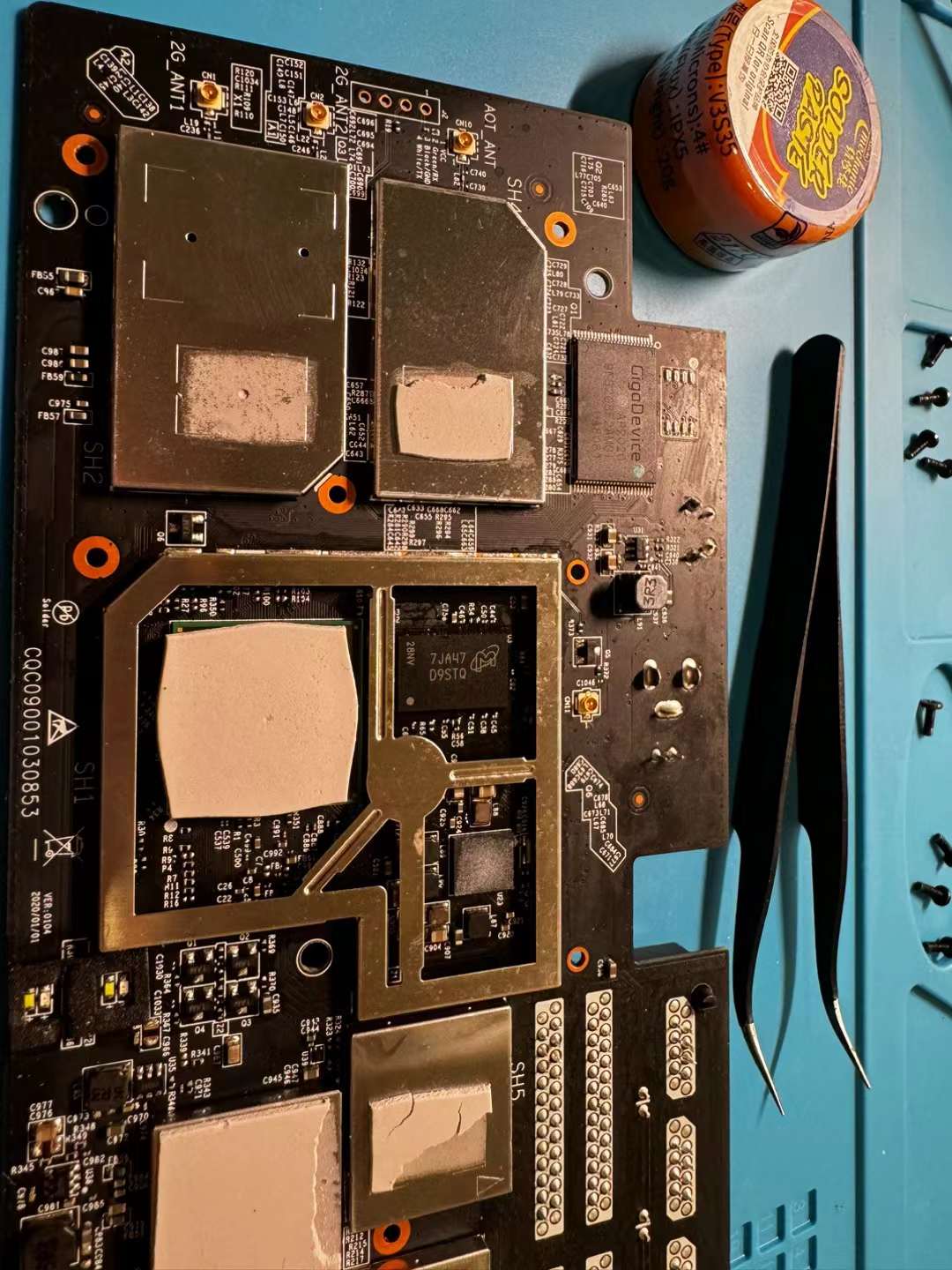
Chip type: magnesium light D9STQ, single crystal 1G
Tools: hot air gun, soldering flux, tweezers
Method: apply a circle of solder, blow at 400 degrees and 50% wind speed for about 30s, gently remove the original 512M memory, then use a soldering iron to clean the welding pad, apply solder, put on the new memory chip, and use a hot air gun to blow until it automatically returns to its position
After booting up, you need to flash cdt to recognize the 1G memory, the method to flash cdt is:
mtd write /tmp/cdt-AX6-AX3600-1G.bin /dev/mtd5
Misc
The default SSH password can be calculated from the SN: ssh default password calculation tool address
The official Xiaomi system is built based on Openwrt 18.06 SNAPSHOT version, and the currently available opkg source:
src/gz openwrt_base http://downloads.openwrt.org/snapshots/packages/aarch64_cortex-a53/base
src/gz openwrt_luci http://downloads.openwrt.org/snapshots/packages/aarch64_cortex-a53/luci
src/gz openwrt_packages http://downloads.openwrt.org/snapshots/packages/aarch64_cortex-a53/packages
src/gz openwrt_routing http://downloads.openwrt.org/snapshots/packages/aarch64_cortex-a53/routing
or
```bash
src/gz openwrt_base http://downloads.openwrt.org/releases/18.06.9/packages/aarch64_cortex-a53/base
src/gz openwrt_luci http://downloads.openwrt.org/releases/18.06.9/packages/aarch64_cortex-a53/luci/
src/gz openwrt_packages http://downloads.openwrt.org/releases/18.06.9/packages/aarch64_cortex-a53/packages/
src/gz openwrt_routing http://downloads.openwrt.org/releases/18.06.9/packages/aarch64_cortex-a53/routing/

```

```bash
opkg update && opkg install xxxx

```
Commonly used software packages: tmux iperf3 zerotier tailscale
shellclash installation:
export url='https://cdn.jsdelivr.net/gh/juewuy/ShellClash@master' && sh -c "$(curl -kfsSl $url/install.sh)" && source /etc/profile &> /dev/null
或者
export url='https://cdn.jsdelivr.net/gh/juewuy/ShellClash@master' && wget -q --no-check-certificate -O /tmp/install.sh $url/install.sh  && sh /tmp/install.sh && source /etc/profile &> /dev/null
Lucky Installation:
curl -o /tmp/install.sh http://www.daji.it:6/files/golucky.sh && sh /tmp/install.sh http://www.daji.it:6/files 2.5.2
若无法加载请检查网络环境。
若无法加载请检查网络环境,或切回 Disqus 稍后再试。