For details on purchasing this Chrombook, see: https://jimizhou.com/chromebook-spin-713-3w
Recently, I used this laptop as my main work device and found that the battery was drained after closing the lid for a weekend. Using the powercfg /A command to query, I found that the current supported sleep mode is Standby (S0 Low Power Idle) with network connection, and the deeper S3 standby mode is not enabled.
PS C:\Users\SPIN> powercfg /A
此系统上有以下睡眠状态:
    待机 (S0 低电量待机) 连接的网络

此系统上没有以下睡眠状态:
    待机 (S1)
        系统固件不支持此待机状态。
        当支持 S0 低电量待机时,禁用此待机状态。

    待机 (S2)
        系统固件不支持此待机状态。
        当支持 S0 低电量待机时,禁用此待机状态。

    待机 (S3)
        当支持 S0 低电量待机时,禁用此待机状态。

    休眠
        尚未启用休眠。

    混合睡眠
        待机(S3)不可用。
        休眠不可用。
        虚拟机监控程序不支持此待机状态。

    快速启动
        休眠不可用。
After conducting a search, I found that using the following command to modify the registry can enable S3 sleep:
reg add HKLM\System\CurrentControlSet\Control\Power /v PlatformAoAcOverride /t REG_DWORD /d 0
After restarting, I can indeed select S3 sleep, but after actual testing, waking up from sleep causes a BSOD blue screen issue on this Spin-713, with an error message of VIDEO_TDR_FAILURE, corresponding to the Intel integrated graphics driver. After searching for information and upgrading/downgrading the driver version, I couldn't find a solution, so I had to give up on the S3 sleep method and use the following command to delete the registry information:
reg delete HKLM\System\CurrentControlSet\Control\Power /v PlatformAoAcOverride
And use the following command to turn on hibernation:
powercfg /H on
The current sleep state information is:
PS C:\Users\SPIN> powercfg /A
此系统上有以下睡眠状态:
    待机 (S0 低电量待机) 连接的网络
    休眠
    快速启动

此系统上没有以下睡眠状态:
    待机 (S1)
        系统固件不支持此待机状态。
        当支持 S0 低电量待机时,禁用此待机状态。

    待机 (S2)
        系统固件不支持此待机状态。
        当支持 S0 低电量待机时,禁用此待机状态。

    待机 (S3)
        当支持 S0 低电量待机时,禁用此待机状态。

    混合睡眠
        待机(S3)不可用。
        虚拟机监控程序不支持此待机状态。
Finally, modify the power strategy to hibernate when the lid is closed, so the laptop can spend a happy weekend in the bag with ultra-low power consumption~
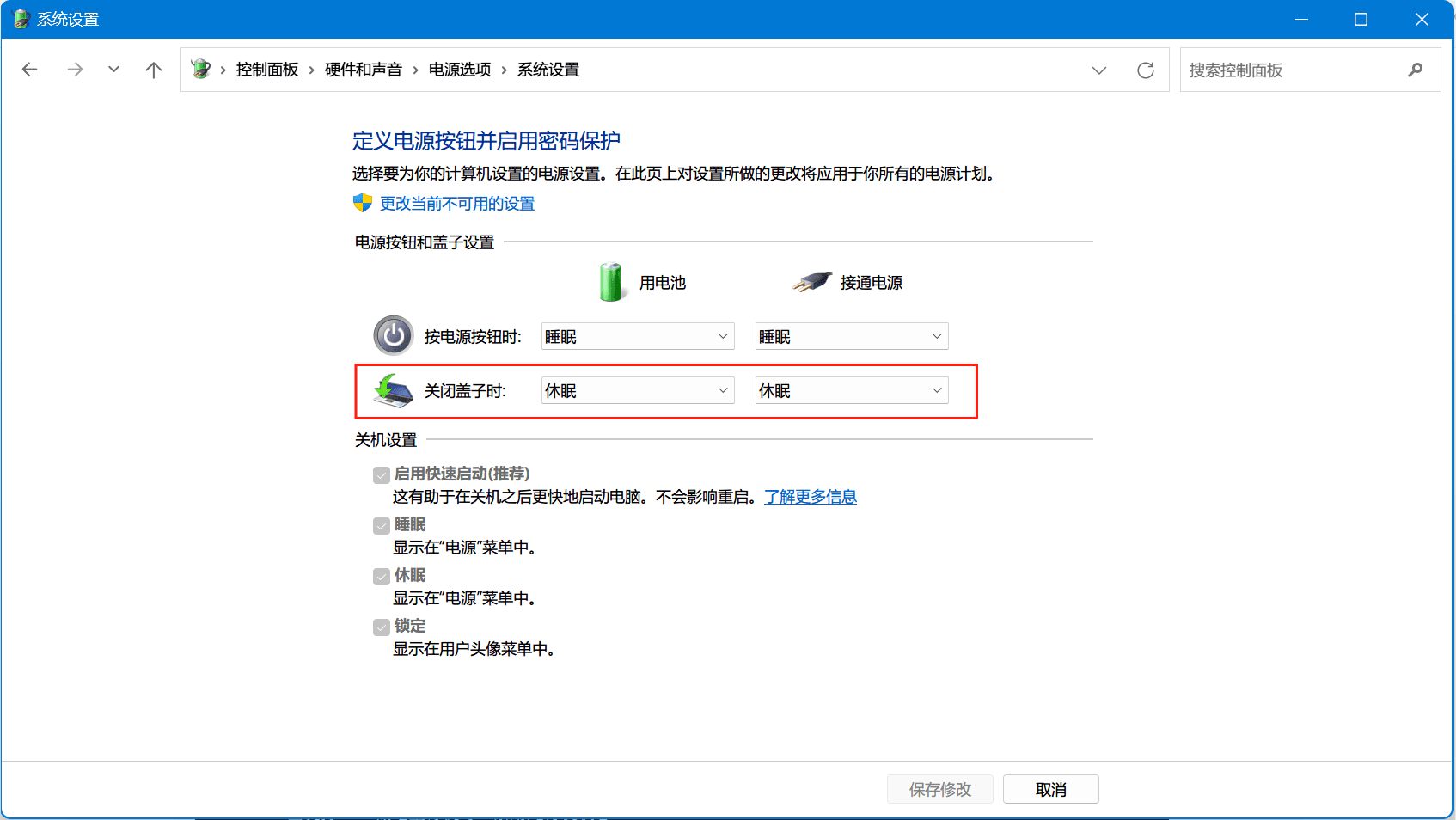 PS: The wake-up speed of hibernation is approximately 20s, which is slightly worse than the 1-second wake-up experience of sleep mode, but in my usual usage scenario, I only close the lid and put the laptop in my bag after work or on weekends, so it's worth sacrificing some wake-up speed to avoid power consumption during sleep.
若无法加载请检查网络环境。
若无法加载请检查网络环境,或切回 Disqus 稍后再试。